Showing posts with label CSS. Show all posts

Friday, 24 May 2013

DIVs vs Tables - Page Layout

I am an old school web designer, who has used tables to desgin website layout. Unfortunately (or fortunately) this is method of page layout is no longer being supported, and Div tags are the way to go.

I am aware of DIV tags, but I have never used exclusively to design a whole page layout, I have used them in conjuction with tables.

Here is my oportunity to ditch the tables and learn how to use the DIV tag.

QUOTE:
<div> is the professional way of designing the webpage. It provides flexibility in web designing as you can make any kind of design using CSS. But the problem with CSS is that, its debugging is not easy and people find it hard to learn. That’s why they stick to <table>.<table> is easier to learn and implement as you have to only figure out the layout of rows and cells.
source: http://theprofessionalspoint.blogspot.com.au/2012/04/div-vs-table-tag-which-one-to-use.html


The two most useful sites for learning and understanding DIV tags are:

W3Schoolshttp://www.w3schools.com/

and

Youtubehttp://www.youtube.com

Both these sites were a fantastic resoruce for learning how to use DIV tags, and the associated CSS styles.

Youtube Video Links:

Learning to use CSS and DIV Tags for Columns in Dreamweaver
http://www.youtube.com/watch?v=vSJT7Wf6A04

HTML div tag Example and Tutorial using CSS
http://www.youtube.com/watch?v=68kiDajh1lg

HTML 101 - The Div Tag
http://www.youtube.com/watch?v=3JvUqqKNh8M

Floating Div Tags :: Dreamweaver Tutorial
http://www.youtube.com/watch?v=B_JLXPDH-jY

Relative and Absolute Positioning of Div Tags, Nesting Tags
http://www.youtube.com/watch?v=YLWLfzx4nq0

Links:


The Professionals Point: DIV vs TABLE tag: Which one to use?
http://theprofessionalspoint.blogspot.com.au/2012/04/div-vs-table-tag-which-one-to-use.html

Adobe Community: Choosing <div> vs <table> layout
http://forums.adobe.com/thread/1183246

HTML Layouts - W3Schools
http://www.w3schools.com/html/html_layout.asp

Tuesday, 14 May 2013

Basic Ready-to-Use CSS Styles

Here is just another quick little link I found today, which want to include in my blog.


Basic Ready-to-Use CSS Styles: http://tympanus.net/Tutorials/BasicReadyToUseCSSStyles/

Monday, 13 May 2013

CSS Trickery - Actually just some cool CSS

In my recent research phase into Image sliders, I uncovered a world of CSS tips and tricks. I want to document these CSS tricks/tips, for my reference just in case I want to use them in my website.

Links to the CSS trickery that I like


http://tympanus.net/Tutorials/ElasticSlideshow/index.html - I might be able to use this as my navigation.


http://tympanus.net/Tutorials/BlurMenu/index5.html - Oh I REALLY like this one. - Blur Menu.


Sunday, 12 May 2013

Image Sliders

Today I am looking at image sliders.

Some use Javascript, others use CSS only.

The CSS only image sliders, initially appear to be the easiest to use and I have looked into this a little more.

The major problem, that I have found with the CSS code for the slider, is that the back-button on the browser does not instantly go back to the previous page, but instead goes back to the previous image of the image slide. This is not a good thing, especially if you have viewed many images, and the the back button then appears not to work.

A few solutions to this, is to "navigate" away from this page using a navigation system, rather than the back button.

Some Image Sliders - CSS Only


http://tympanus.net/Tutorials/CSS3Lightbox/index.html

http://tympanus.net/Tutorials/CSS3FullscreenSlideshow/index4.html - A CSS-only slideshow for background images

http://tympanus.net/Tutorials/CircleNavigationEffect/ - Nice. I can see myself using this one.


Some Image Sliders - JScript etc

http://tympanus.net/Tutorials/ItemBlur/  - uses CSS and JQuery. I like this for a navigation system.

Friday, 26 April 2013

Website Navigation

Being able to navigate easily through a website is a very important thing. Without good navigation, a website can become very frustrating to use, and the end user will leave your website in disgust.

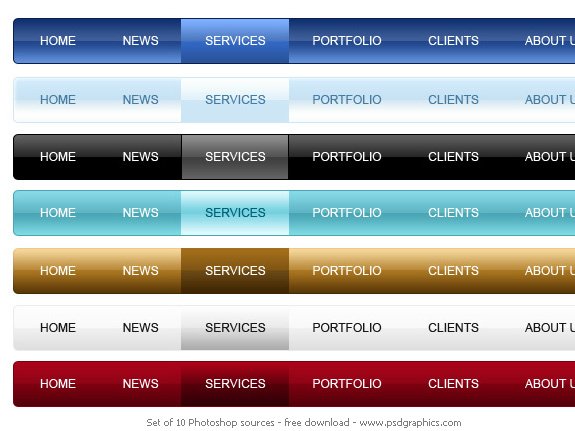
The type of navigation, that I was thinking of having on my website, would be some sort of horizontal bar near the top. Maybe with a simple roll-over effect, but not much more than that. I don't want the navigation to system to be any more advanced that it has to be.

Here are some sample screen captures of what I had in mind:


If my website grows and ends up having many pages, then I would consider putting in some sort of "fly-out" secondary navigation, but this is relatively easy to do using CSS. I am not proposing anything fancy here.

Ultimate Guide to Website Navigation Design Patterns
A sample of "fly-out" navigation system

Links:

Web Design Navigation Showcases | Smashing Magazine

Website Navigation - Web Page Mistakes
http://www.webpagemistakes.ca/website-navigation/

Guide to Website Navigation Design Patterns - Six Revisions
http://sixrevisions.com/user-interface/navigation-design-patterns/

Some CSS code for drop down navigation bars
http://css3menu.com/